Smart reminders are here. Get notified when candidates go quiet or a job isn't getting the applicants you expected, so you can act before things stall.
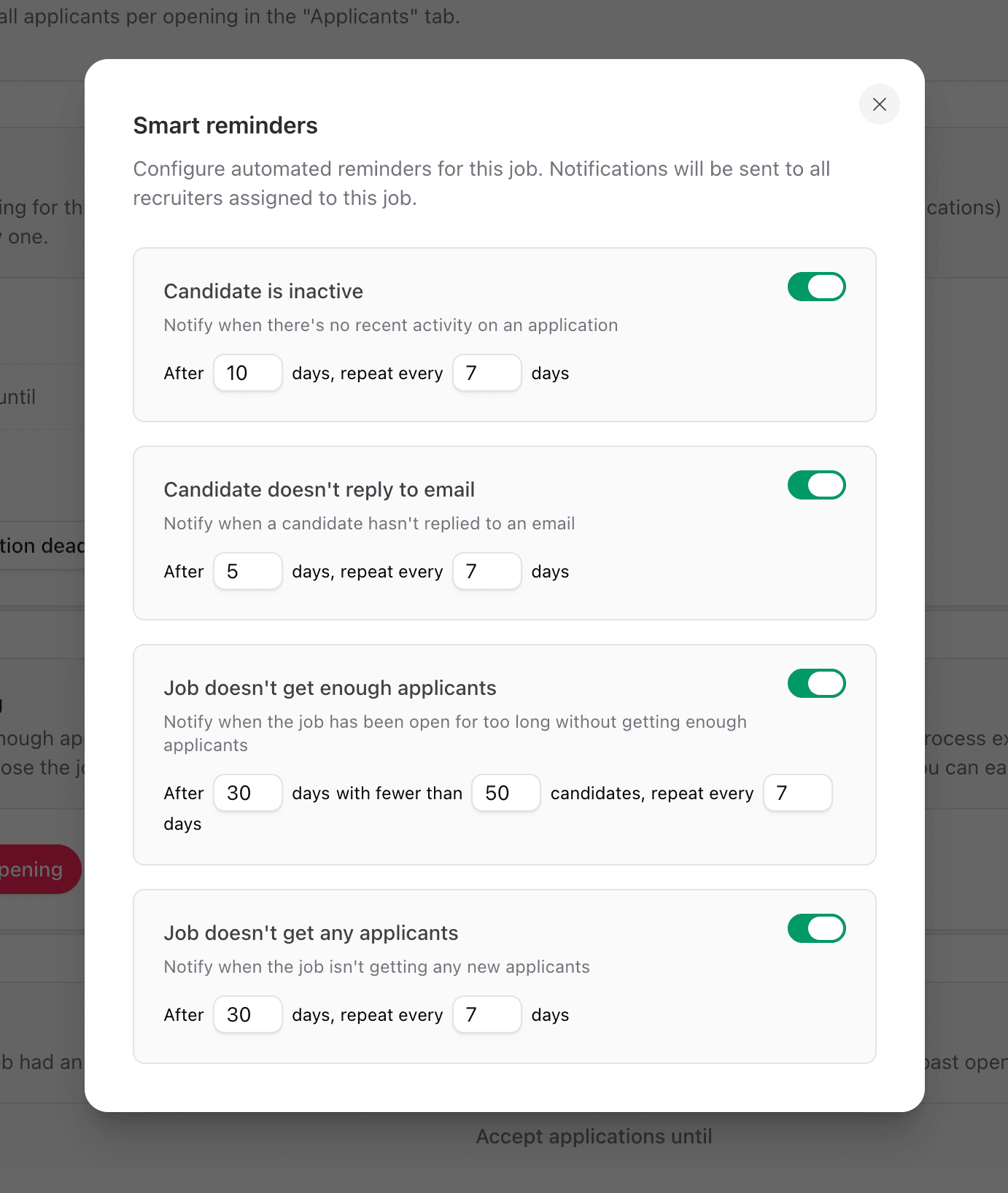
Things fall through the cracks. A candidate goes silent and you remember them three weeks later. A job is open for a month and nobody notices the pipeline is dry. You configure reminders per job and the right people get pinged at the right time.
What you can configure
There are four types of reminders. Each one has its own timing and repeat interval.
Candidate is inactive: notify when there's no recent activity on an application.
Candidate doesn't reply to email: notify when a candidate hasn't replied to an email after N days.
Job doesn't get enough applicants: notify when a job has been open for a while but hasn't hit your expected applicant count.
Job doesn't get any applicants: notify when a job isn't getting any new applicants at all.
Set the "after N days" and "repeat every N days" values per reminder. Default values are sensible; tweak them if you want a gentler or more aggressive cadence.
Who gets notified
Everyone assigned to the job as a recruiter. Change the assignment and reminders follow.
How to turn it on
Open any job and click Reminders in the sidebar. Toggle the ones you want and save.